Gestión Smart
EN
Request a demo

An AI that answers your calls

An AI voice agent that answers your business’s phone and WhatsApp.

30-minute demo, with no commitment. A member of our team will reply to you.

Would you rather check it now? Call +372 699 1693 and our voice agent will answer.

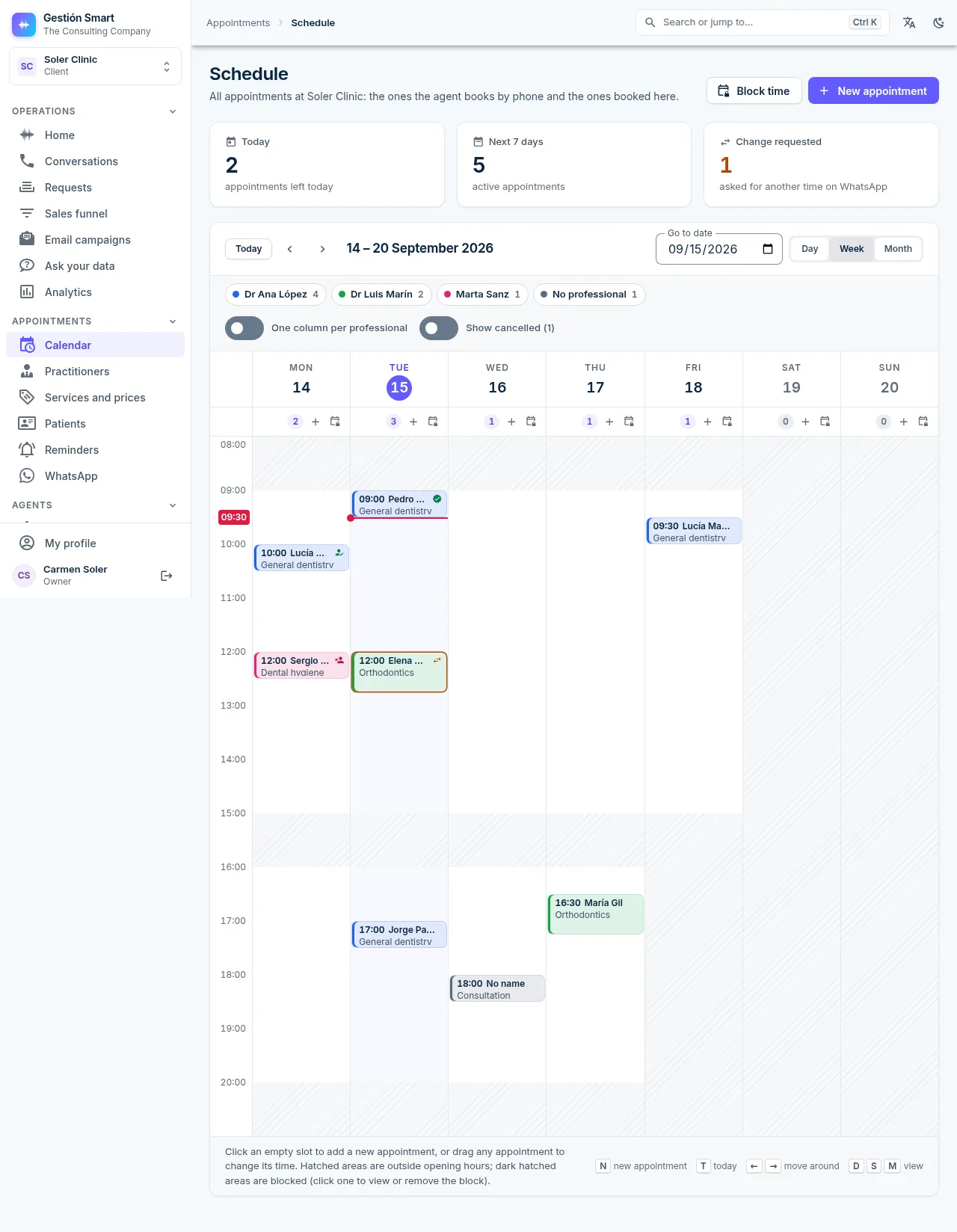
Panel calendar with one column per professional and the day’s appointments laid out by the hour.
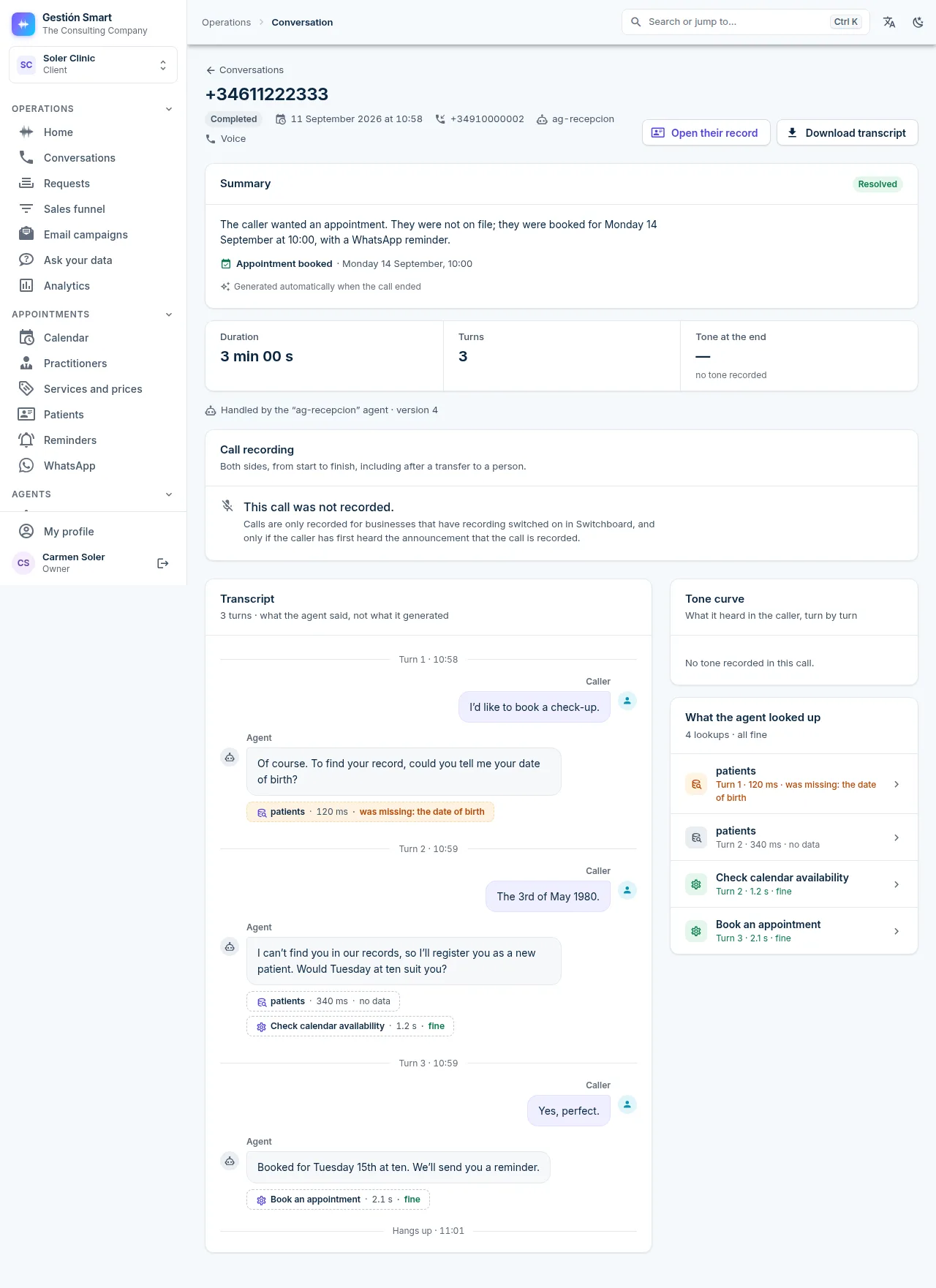
Details of a conversation in the panel: turns by the agent and by the caller, with the time and the response time.
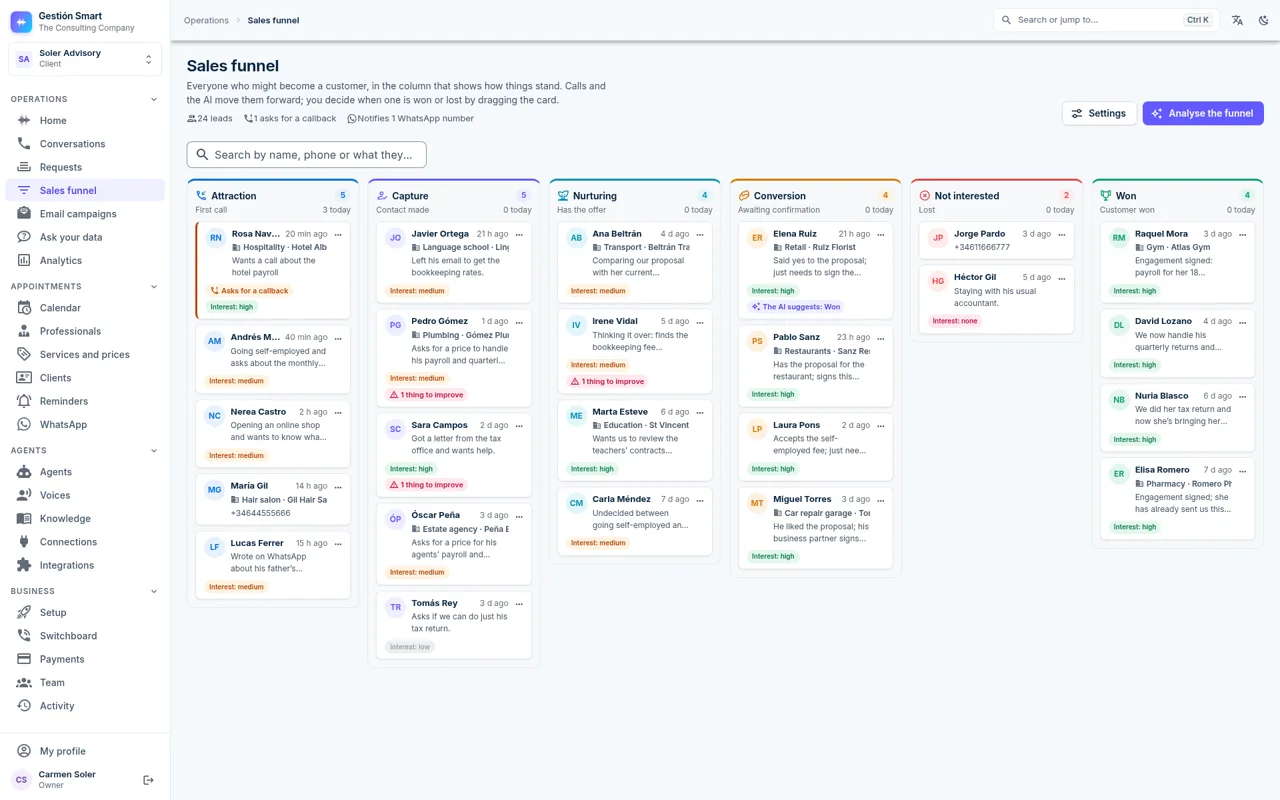
Sales funnel in the Gestión Smart panel: six columns with the leads of a sample accounting firm, each with their sector, their need, their level of interest and whether they have asked for a callback.
24/7Answers 24 hours a day. One simultaneous call included, expandable to 25
€120Single plan: €120 + VAT a month, with 1,000 minutes, WhatsApp and a professionally designed landing page.
1 dayUp and running in a day. Additional integrations in three weeks at most
Appointments on your real calendar
It only offers available slots
AI notice on every call
As required by the EU AI Act

Every call answered

Your customers get an immediate answer: the agent recognises them by their number, gives them an appointment, tells them the status of their request and addresses them by name, even if your team is just two people.

The usual answer: leave a message and wait for someone to call back.
Later
With Gestión Smart: the appointment is settled during the call itself.
Now

Answer like a large company

Every sales call, a qualified lead

The agent logs every potential customer in the “Attraction” stage, with their sector, what they need and how interested they are, without anyone having to type a thing, and lets your team know by WhatsApp.
Appointments on your real calendar

The agent offers only the free slots in your calendar, respects blocked times and books the appointment during the call. Afterwards, up to six WhatsApp reminders go out, each with a link to cancel it.

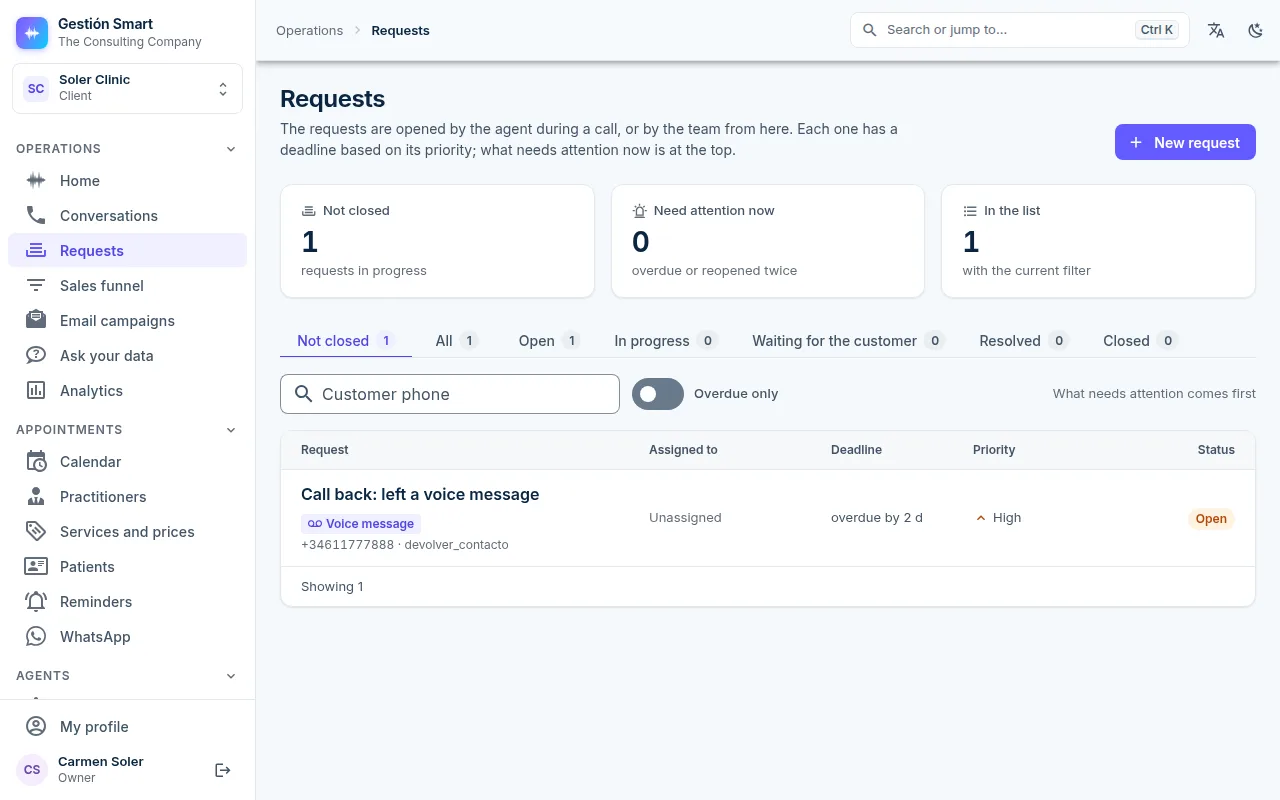
Every request, with an assignee and a deadline

The priority sets the deadline automatically (4 h, 24 h, 72 h or 7 days), overdue requests appear first and the customer checks the status of their request on a private link, without calling again.

Take payment during the call

The agent sends the payment link to the customer’s mobile during the call, so they can pay without hanging up. It can also take a card payment over the phone or set up a recurring fee, and each payment is linked to its call and its appointment.

Every call, transcribed and measured

Each turn is logged with what was said, how long the agent took to respond and what it looked up. Transcription is done on GPUs in our own infrastructure: the audio is not sent to third parties.

Recognises every customer by number

Every call creates or updates the customer’s record by their number, and the agent greets them by name. If they ask to speak to someone, it transfers the call to that person or to whoever is available; if nobody is, it takes a note and opens a request to call them back.

A workshop call, step by step

A customer calls a workshop to find out whether her car will be ready.

01:12

Incoming call · Vidal Bros. GarageAI notice played

What the agent looks up during the call

  • The customer record, identified by their number
  • The status of the repair, in real time
  • Collection slots available on Thursday
  • Who the request is assigned to
00:00Workshop agent

Vidal Brothers Garage, good afternoon. You’re speaking to a virtual assistant powered by artificial intelligence. How can I help you?

00:07Customer

Good afternoon. I’m calling about the car I left on Monday, the Golf. I wanted to know whether it will be ready by Thursday, as it would suit me to come and pick it up then.

00:19Workshop agent

I recognise you from your number, Marta. Your Golf came in on Monday for the clutch and right now it’s waiting for a part. For collection on Thursday, I have two times available: 9:30 or 12:00.

00:35Customer

Twelve would be better. But if the part doesn’t arrive, please let me know, because I don’t want to make the trip for nothing.

00:45Workshop agent

Booked: Thursday at 12:00 for collection. On Wednesday evening I’ll send you a reminder with a link in case you need to cancel. I’m also leaving a request for the workshop manager to confirm the part with you; the reference is AV-0042, let me spell it out: A, V, zero, zero, four, two.

01:05Customer

Perfect, thank you very much.

01:08Workshop agent

Thank you, Marta. Have a good afternoon.

Automatically recorded in the panel

Record

Marta I. · +34 6·· ··· ···

Appointment

Thursday 12:00 · vehicle collection

Reminder

Wednesday 18:00, with a link to cancel

Request

AV-0042 · workshop manager · normal priority (72 h)

Example dialogue. This text is a re-creation to show how a call works. You can also listen to a recorded call with the agent.

What you will hear, in order

  • The artificial intelligence notice, before the agent speaks.
  • “I don’t have the reference to hand.” The agent locates it from the caller’s number.
  • The status and the committed deadline: instead of a “we’ll call you back”, the exact day and time.

Listen to the voice agent handle a call

A customer calls to find out the status of a fault they reported earlier and does not have the reference to hand. The agent finds it and tells them the status and the time the team has committed to. The whole call lasts less than a minute.

0:00

A test call, not one from a customer.

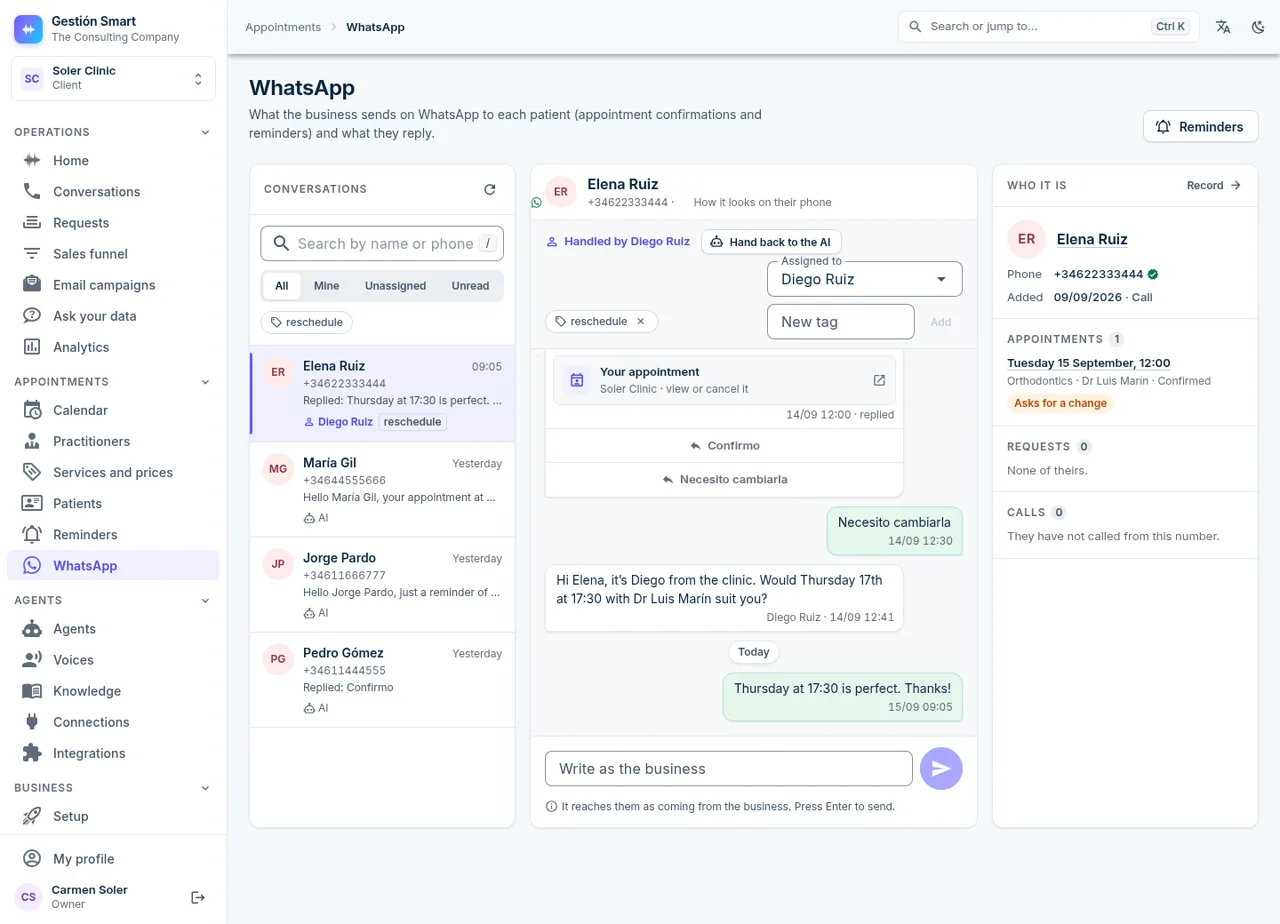
Details of a conversation in the panel: turns by the agent and by the caller, with the time and the response time.Panel calendar with one column per professional and the day’s appointments laid out by the hour.Panel requests inbox with the priority, assignee and committed date of each request.Panel WhatsApp inbox: the conversation with a patient who is asking to change her appointment, handled by a member of the team, with her record alongside.

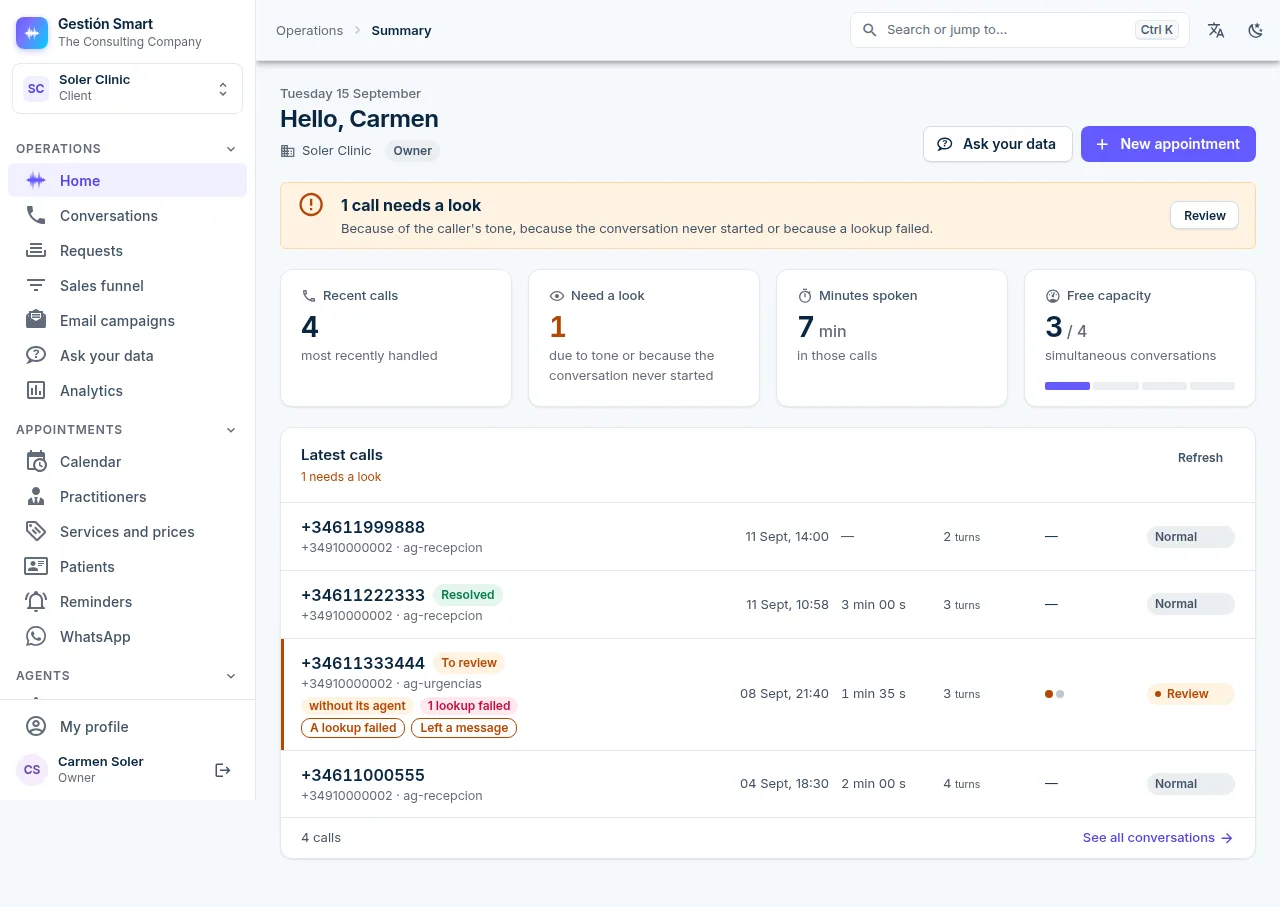
One panel to supervise everything

The screens you will use every day: conversations, calendar, requests and WhatsApp, with each customer’s record in the CRM and your team’s sales funnel.

Full transcript, with timings

Each turn shows the time, the response time and the data the agent looked up.

Details of a conversation in the panel: turns by the agent and by the caller, with the time and the response time.

One column per professional

The appointments the agent books appear here, only in slots that are genuinely free.

Panel calendar with one column per professional and the day’s appointments laid out by the hour.

Every request, with owner and deadline

Every request the agent opens goes into the inbox with its reference and a deadline based on its priority.

Panel requests inbox with the priority, assignee and committed date of each request.

WhatsApp linked to every appointment

Confirmations and reminders are sent automatically, and the customer’s reply updates their appointment.

Panel WhatsApp inbox: the conversation with a patient who is asking to change her appointment, handled by a member of the team, with her record alongside.

Your business on your phone too

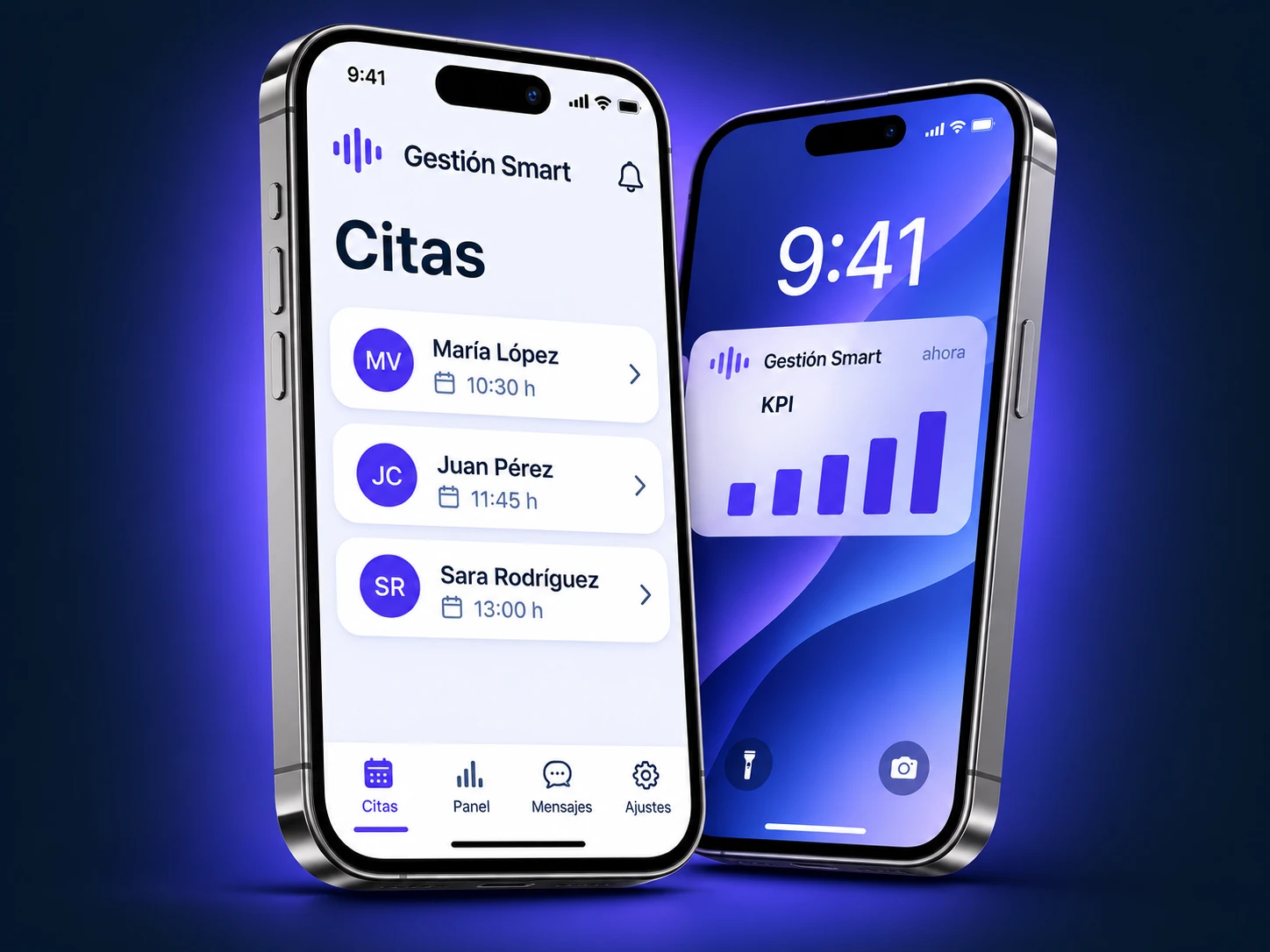
We are building the Gestión Smart app and KPI notifications so you stay in control without opening a computer.

The Gestión Smart app

To update from your mobile everything the agent writes in the panel as it goes: appointments, requests, customer records and sales leads.

KPI notifications

Alerts on your mobile with your business’s key figures, so you know how it is going without opening the panel.

Request a demo

The Gestión Smart app on an iPhone: appointments list and a KPI notification on the lock screen.

Know what stage every sale is at

Sales calls are logged automatically on a kanban board and the AI moves them from stage to stage: it summarises each lead, notes what their company does and suggests the next step.

See how the sales funnel works

Panel sales funnel: six columns, from the first call to the customer won, with a sample accounting firm’s leads.

Outbound calls: collections and sales

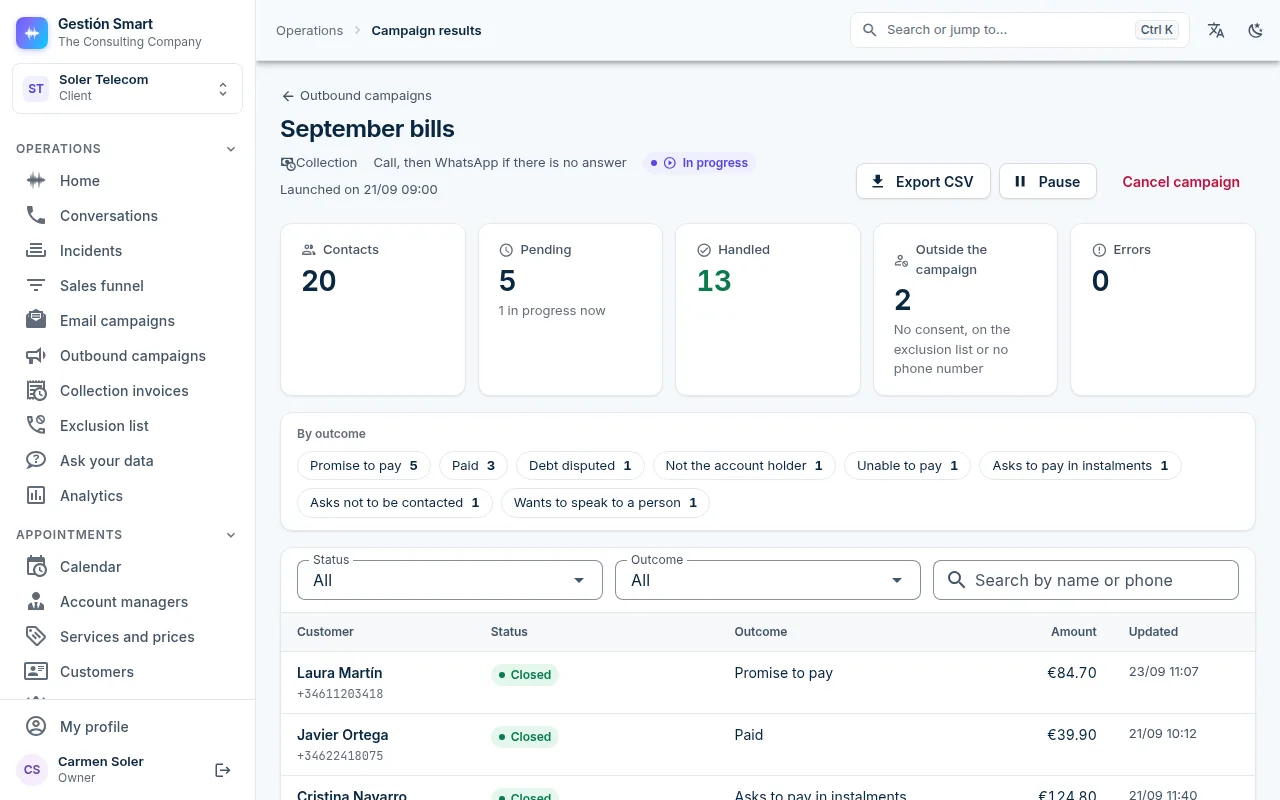
The voice agent calls your customers or messages them on WhatsApp to remind them of outstanding payments, present offers and win back those who have not been in touch with you for some time.

See how outbound campaigns work

Results of a collection campaign in the panel: contacts, contacts handled, a count by result and the list of customers with their amount, for a sample telecoms company.

Up and running in a day, in three steps

You do not have to change your number or your switchboard: you simply forward the calls you choose.

You choose which calls to forward

All of them, only those not answered after three rings or only those outside opening hours.

We set the agent up for your business

Services, prices, opening hours, the length of each appointment and what information the agent may share: all of it.

It goes live and you supervise it from the panel

From the first call, you have the transcript, the requests and the calendar.

Integration with your CRM and systems

Ready-made connectors for HubSpot, Salesforce, Dynamics 365, Zoho CRM, Pipedrive, Odoo, monday.com, Zendesk, Holded and WooCommerce.

Request a free consultation

Ready-made connectors in the panel

  • Salesforce
  • HubSpot
  • MicrosoftDynamics 365
  • Zoho
  • Pipedrive
  • Odoo
  • Zendesk
  • monday.com
  • Holded
  • WooCommerce

Custom integration, within three weeks at most

  • SAP
  • Sage
  • And any other system with an API

Brands and logos belong to their respective owners. The connection is made through each system’s API; some connectors require a specific plan from the provider (for example, Salesforce Enterprise or Odoo 19 on the Custom plan).

Is your business not on the list?

If your business books appointments, logs incidents or gives updates by phone on the status of orders or services, we configure the agent with your vocabulary and your processes.

Tell us about your case

A voice agent configured for your sector

A clinic does not answer calls the way a workshop does: the vocabulary.

Transparency and control over your data

The artificial intelligence notice plays on every call and cannot be switched off. You decide all the other settings, and a record is kept of who changed them.

More about privacy and security

Recording off by default

It is only switched on if you so decide, and a call is never recorded unless the AI notice has played.

You decide the retention period

Between 7 days and 3 years. If you do not set a period, recordings are deleted after 30 days.

Five access roles

Owner, editor, read only, billing and the platform team. Every playback of a recording is logged.

Health data is not sent to the AI

It does not reach the agent or any AI model. Sensitive data is encrypted, and a record of consent is kept.

Speech recognition on our own servers

We transcribe calls on our own GPUs: neither the audio nor the transcript is sent to third-party services for speech recognition.

What is coming

Logistics and delivery

We are developing a logistics and delivery module: delivery slots, notifications to the recipient and shipment status checks by phone. It is not available yet and has no launch date.

See the logistics module (coming soon)

Everything in Gestión Smart

AI phone answering, the full panel and setup in a day. One monthly fee, with no paid add-on modules.

€120+ VAT a month

Request a demo

Additional minute: €0.65 + VAT, with no service cut-offs

What is included

  • 1,000 minutes of conversation a month
  • 1 call at a time, expandable to 25 in parallel
  • 1 voice agent and 1 phone number
  • 2 people with panel access
  • The full panel: calendar, records, sales funnel, requests, payments and switchboard
  • WhatsApp: confirmations, reminders and notifications
  • Setup in a day, done by our team

Questions before you start

Do I need to change my number or my switchboard?

No. You forward the calls you choose to our agent (all of them, those not answered after three rings or those outside opening hours), or we assign you a new number.

How long does setup take?

The agent is ready in a day. Additional integrations with your systems take three weeks at most.

What happens if two people call at the same time?

The plan includes one simultaneous call: the second person waits their turn or leaves a message, depending on how you set it up. If you need more, we can expand to up to 25 simultaneous calls.

Does it connect to my CRM?

There are ready-made connectors for HubSpot, Salesforce, Dynamics 365, Zoho CRM, Pipedrive, Odoo, monday.com, Zendesk, Holded and WooCommerce. For other systems with an API, we develop the integration within three weeks at most. The consultation is free.

Will my customers know they are talking to an AI?

Yes. At the start of every call, a notice plays telling them they are speaking to an artificial intelligence, as required by the EU AI Act. It cannot be switched off.

What happens to my customers’ data?

Before the first call is answered, we sign the data processing agreement with you. Recording is off by default, and health data does not reach the agent.

How much does it cost?

A single plan at €120 + VAT a month, with 1,000 minutes, the voice agent, a number, WhatsApp, the full panel and a professionally designed landing page. Each additional minute costs €0.65 + VAT, and going over your allowance does not cut off the service.

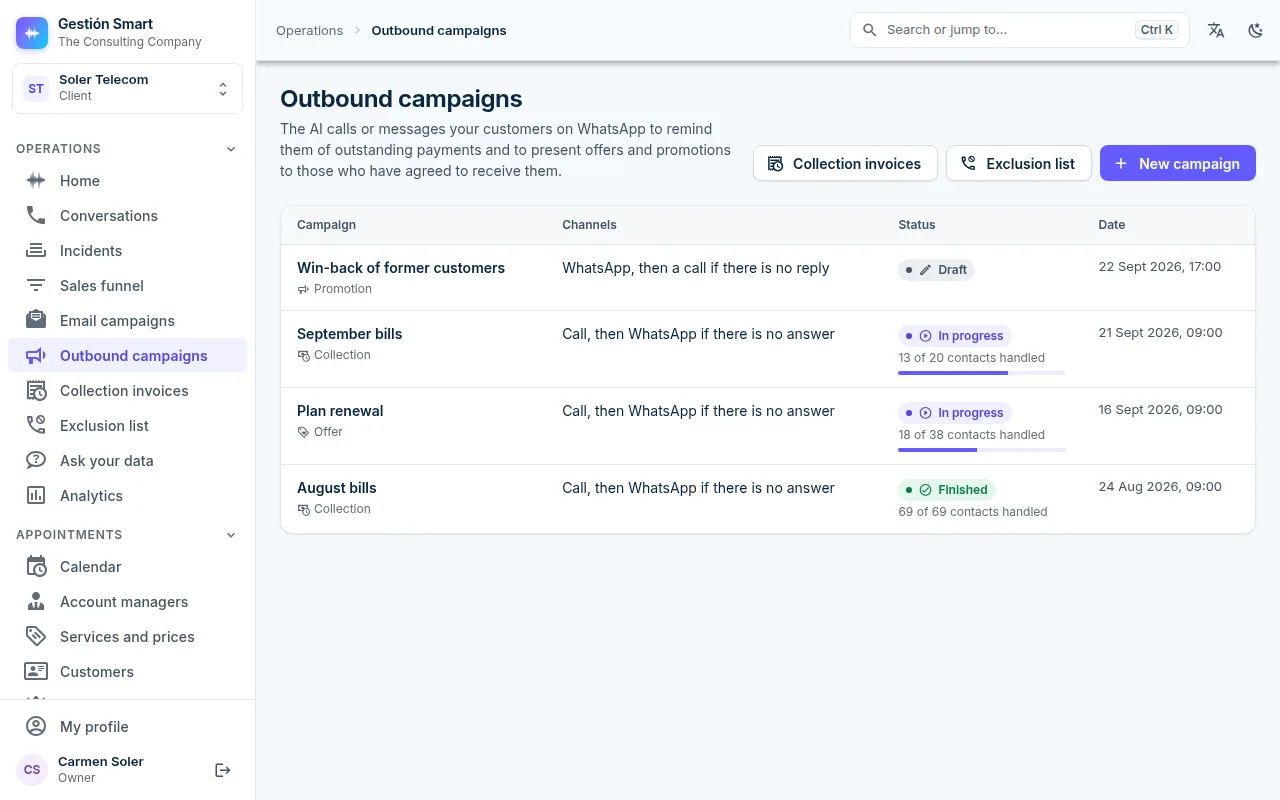
List of outbound campaigns in the Gestión Smart panel: two collection campaigns, an offer and a promotion in draft, with their channels, status and contacts handled.
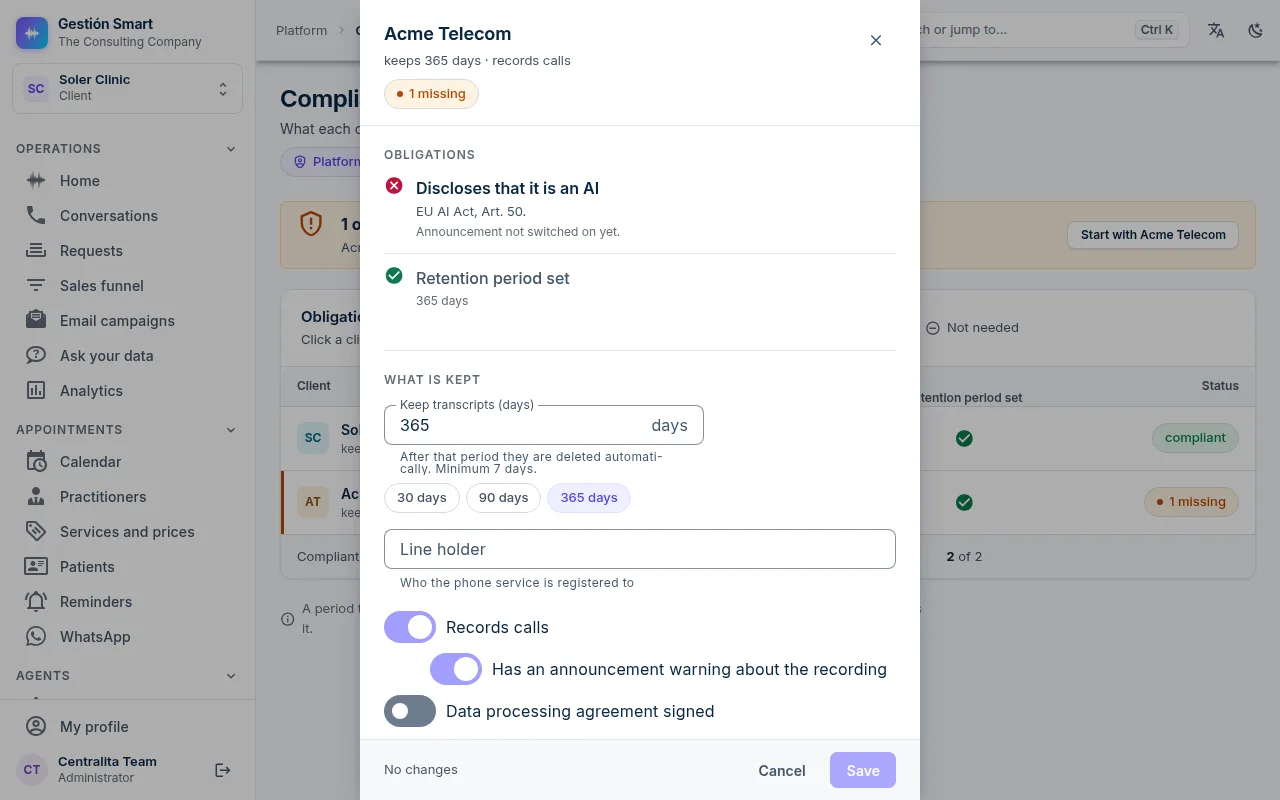
Panel Compliance screen: the AI notice marked as mandatory, the retention period set to 365 days and the switches for recording and the data processing agreement.

See how it would answer your business’s calls

We set up an agent with your services, opening hours and way of working, and you test it by calling from your mobile. Afterwards, we review that call together in the panel.

Or check it now: call +372 699 1693 and our voice agent will answer.

See the plan and the price